Rule Settings
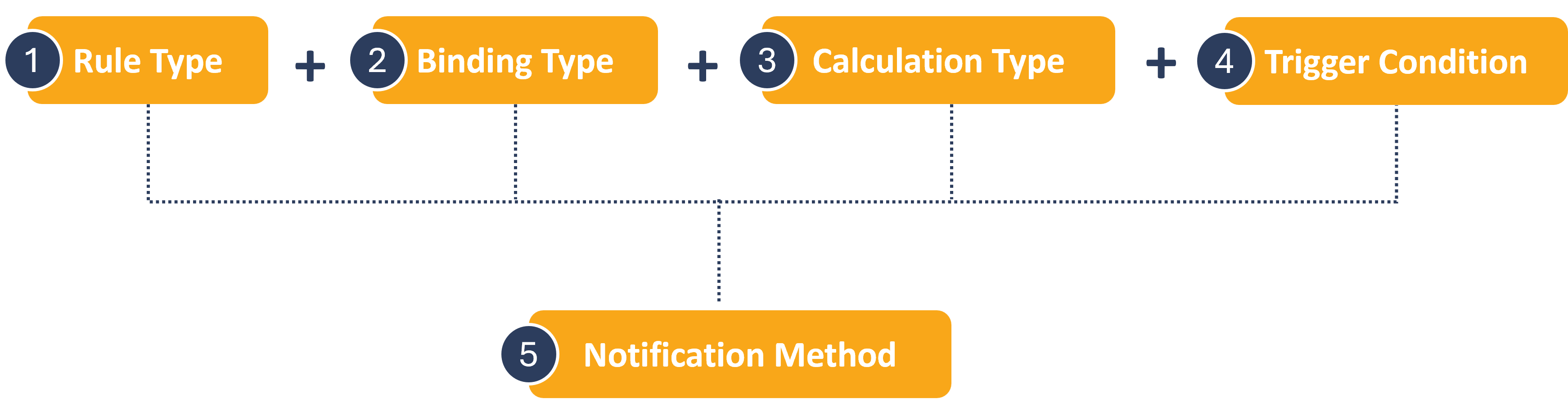
The process of creating a new rule involves several steps to define the rule settings. The rule settings include:
- Rule Type: Choose from 8 different rule types.
- Binding Type: Determine the scope of application for the rule.
- Calculation Method: Set a threshold to determine when the rule is applicable
- Trigger Conditions: Specify a value to trigger a notification
- Notification Method: Set the type of method that is generated.
The process of creating a new rule is shown here.
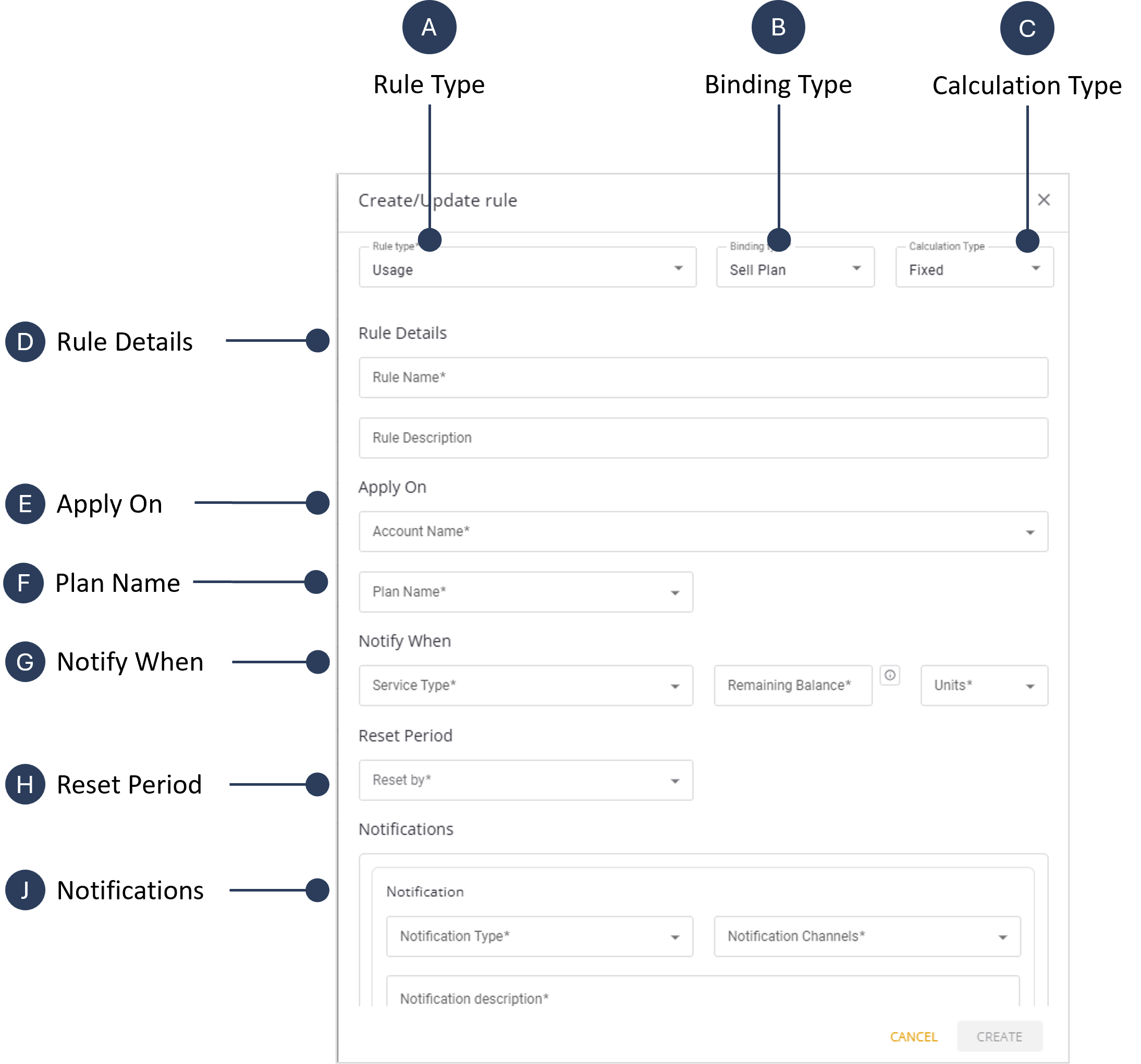
A screen capture of the Rule Settings dialog box is shown here.
Rule Types
Users can create different types of rules as described in this table.
| Rule Type | Description |
|---|---|
| Usage | Applies to SIMs attached to a Usage Plan. Tracks data and SMS consumption for accounts or SIMs; SIM pre-paid balance of data and SMS services. |
| Money | Applies to SIMs attached to a Money Plan. Monitors account balances and spending limits and tracks the SIMs pre-paid money balance. |
| Rate | Applies to SIMs attached to an Account Rate Plan. Monitors usage or costs consumption associated with various services to prevent overspending. |
| Plan Rate | Applies to SIMs attached to Plan Rate. Notifications are based on usage for specific plans. |
| First Event | Generates notifications on the first instance of SIM activity. |
| Pool | Monitors usage across a group of SIMs linked to a shared plan (i.e. Pool Plan). |
| Inactivity | Notifies users regarding SIMs that have not shown activity within a defined period. |
| SIM Monitoring | Monitors SIM-specific activities and notifications for changes such as device attachment, country change, etc. |
Binding Types
Each rule must have a binding type to determine its application scope. A description of the various binding types is provided in this table.
| Binding Type | Description |
|---|---|
| Account | Applies to all SIM members of the account. |
| SIM | Targets a specific individual SIM. |
| Account Aggregation | Tracks the total usage for all SIMs allocated to a specific account. |
| Sell Plan | Links the rule to all account SIMs attached to a specific sell plan created for customers. |
| Buy Plan | Applies the rule to all account SIMs attached to a specific plan created by the user parent account. |
Calculation Type
The calculation type (or method) defines the rule monitoring type. The calculation metrics vary based on the combination of Rule Type and Binding Type.
A description of the calculation types is provided in this table.
| Calculation Type | Description |
|---|---|
| Fixed | Generates a notification when usage reaches a user-defined threshold. |
| Percentage | Generates a notification when usage falls below a specified percentage of the total prepaid service quota. |
| Money | Monitors monetary spending and triggers notifications when spending reaches a threshold. |
| Service | Monitors service usage (e.g., SMS or data) and triggers notifications based on predefined conditions. |
How Rules are Triggered
The "Apply On" setting and the "Notify When" setting work in sequence to define how and when a rule triggers a notification, but they have distinct roles:
- Apply On: This setting defines the specific population target (account/SIM/Plan etc ) based on the selected binding type. The condition related to that entity must be met for the rule to become active. This condition usually involves a metric and a threshold or other criteria.
- Notify When: This setting defines the threshold type. It determines the exact threshold level to trigger this rule notification. For example notify when SIM pre-paid usage plan left balance fallen to 20%.
The "Apply On" setting establishes the precondition for a notification. The "Notify When" setting specifies the exact value this precondition is satisfied. The rule only triggers a notification if the "Apply On" condition is met, and the "Notify When" conditions are also fulfilled.
For example, consider a rule with these settings:
- Rule Type: Data Usage
- Apply On: SIM: Monthly pre-paid Plan with 5 GB.
- Notify When: When Data left balance fallen below 100MB.
In this scenario, the rule monitors the monthly data usage of all account SIM cards. The "Apply On" setting defines the precondition account name. The "Notify When" setting defines the service type as "Data" and "Remaining Balance" is set to 100 MB.
IMPORTANT: Both "Apply On" and "Notify When" are necessary to fully define the rule monitoring behavior.